Showing posts with label HOA. Show all posts
Showing posts with label HOA. Show all posts
Tuesday, September 20, 2016
Ah well, I figured I'd run my first 'real' #HOA using LIveEvents today but it seems - eh - slightly complicated...
Ah well, I figured I'd run my first 'real' #HOA using LIveEvents today but it seems - eh - slightly complicated compared to the old times. If any of you guys are awake I wouldn't mind someone holding my hand :)

Friday, August 21, 2015
This missed the Daily Summary of Member Hosted HOAs
This missed the Daily Summary of Member Hosted HOAs
Originally shared by Craft Beer Nation
What's for breakfast? Why, BEER of course. But not any old beer. We're talking Breakfast Beers.
So what's a breakfast beer anyway? Does a coffee beer count? A beer with Oats? Hey, isn't Wheaties making a Wheaties Beer?
Does a brewery just throwing in the name Breakfast count? We don't know but we're down to find out. For science and all.
So join us for #FridayNightHangout Episode 172 as we drink and discuss #BreakfastBeer
Click ahead of time on the Event video for a special Craft Beer Nation Breakfast Beer Preview
And feel free to share any opinions you have of breakfast beer so we can share them on air.
To WATCH: Respond "Yes" to the Event Invite and you will receive a notification when the Event goes live. That will bring you back to this event and there will be a link to the live feed here.
To JOIN the HOA: Respond "Yes" to the event, make sure you are following +Craft Beer Nation, and comment here that you want to participate. If we don't know you want to join, we can't add you to the circle of invitees.
To JOIN the AFTER-PARTY: Respond "Yes" to the event, make sure you are following +Craft Beer Nation, and comment here that you want to join just the after-party. You will get an notification that the hangout is starting and a link to join us. Just watch and wait for us to go off the air before clicking the Join. You may still get a warning about joining a Hangout on Air, but rest assured that once we hit the button to stop broadcasting, it would take all of Hillary Clinton's emails to get it running again.
We are Craft Beer Nation and you can find us at the following locations. We'd love to hear from you.
Website
http://craftbeernation.org/blog/
Twitter
https://twitter.com/CBNCommunity
Instagram
https://instagram.com/craftbeer_nation/
YouTube
https://www.youtube.com/user/CraftBeerNation
Stitcher
http://www.stitcher.com/podcast/craft-beer-nation
iTunes
https://goo.gl/5VJpDL
Facebook
https://www.facebook.com/CraftBeerNation
#CraftBeerNation #CBN #FNH #HangoutsOnAir #HOA #FNHBeer #CraftBeer #Breakfast #BreakfastBeer
Originally shared by Craft Beer Nation
What's for breakfast? Why, BEER of course. But not any old beer. We're talking Breakfast Beers.
So what's a breakfast beer anyway? Does a coffee beer count? A beer with Oats? Hey, isn't Wheaties making a Wheaties Beer?
Does a brewery just throwing in the name Breakfast count? We don't know but we're down to find out. For science and all.
So join us for #FridayNightHangout Episode 172 as we drink and discuss #BreakfastBeer
Click ahead of time on the Event video for a special Craft Beer Nation Breakfast Beer Preview
And feel free to share any opinions you have of breakfast beer so we can share them on air.
To WATCH: Respond "Yes" to the Event Invite and you will receive a notification when the Event goes live. That will bring you back to this event and there will be a link to the live feed here.
To JOIN the HOA: Respond "Yes" to the event, make sure you are following +Craft Beer Nation, and comment here that you want to participate. If we don't know you want to join, we can't add you to the circle of invitees.
To JOIN the AFTER-PARTY: Respond "Yes" to the event, make sure you are following +Craft Beer Nation, and comment here that you want to join just the after-party. You will get an notification that the hangout is starting and a link to join us. Just watch and wait for us to go off the air before clicking the Join. You may still get a warning about joining a Hangout on Air, but rest assured that once we hit the button to stop broadcasting, it would take all of Hillary Clinton's emails to get it running again.
We are Craft Beer Nation and you can find us at the following locations. We'd love to hear from you.
Website
http://craftbeernation.org/blog/
https://twitter.com/CBNCommunity
https://instagram.com/craftbeer_nation/
YouTube
https://www.youtube.com/user/CraftBeerNation
Stitcher
http://www.stitcher.com/podcast/craft-beer-nation
iTunes
https://goo.gl/5VJpDL
https://www.facebook.com/CraftBeerNation
#CraftBeerNation #CBN #FNH #HangoutsOnAir #HOA #FNHBeer #CraftBeer #Breakfast #BreakfastBeer
Monday, April 20, 2015
An interesting article - even mentions a few of our User2User community.

An interesting article - even mentions a few of our User2User community.
Originally shared by Andrea Beltrami
8 Google Hangout Strategies To Grow Your Viewership
When Google+ and YouTube hooked up they named their love child Google Hangout. Today that union and labor of love has blossomed into a beautiful thing.
A platform that puts the power of a web show in the hands of the undiscovered. And all without putting a dent in your wallet. Isn’t love grand?
To help you crush it as a host I've got 8 Google Hangout strategies you can employ to help you grow your viewership and get yourself and your show instantly recognizable.
Edumacate yourself here: http://thebrandedsolopreneur.com/googlehangout-visualstrategies/
#googlehangout #hangouts #hangoutsonair #hoa
Tuesday, April 14, 2015
Another neat trick from Michael Daniels
Another neat trick from Michael Daniels
Originally shared by Michael Daniels
Cool trick
https://www.youtube.com/watch?v=uhBGAHCI7CU
#Hashtag #CommentTracker #Comments #HOA #hangoutsOnAir
https://www.youtube.com/watch?v=uhBGAHCI7CU
Originally shared by Michael Daniels
Cool trick
https://www.youtube.com/watch?v=uhBGAHCI7CU
#Hashtag #CommentTracker #Comments #HOA #hangoutsOnAir
https://www.youtube.com/watch?v=uhBGAHCI7CU
Monday, July 14, 2014
Another Comment Tracker "How To" by Mark Crosling. If you aren't familiar with his work, you are in for a treat.
Another Comment Tracker "How To" by Mark Crosling. If you aren't familiar with his work, you are in for a treat.
Originally shared by Mark Crosling
How to Setup the Hangout Comment Tracker
The Comment Tracker collates comments from Google+, YouTube & Twitter to give the Host of the Hangout the opportunity to reply and interact directly with the viewing audience.
The Comment Tracker will be presented in two parts:
Part 1 – comments from the Google+ Event page and from YouTube
Part 2 – comments from Twitter
This first article shows you step-by-step, using detailed screen-shots, on how to install and setup the Hangout Comment Tracker for the Google+ Event page and YouTube.
The second article, will look at creating the widget to corral comments from Twitter into the Comment Tracker.
Click through to read, and to receive new posts on Hangouts sent to your inbox, make sure you Subscribe.
#commenttracker #hangoutsonair #hoa
http://strategiccontentmarketing.co/setup-comment-tracker/
Originally shared by Mark Crosling
How to Setup the Hangout Comment Tracker
The Comment Tracker collates comments from Google+, YouTube & Twitter to give the Host of the Hangout the opportunity to reply and interact directly with the viewing audience.
The Comment Tracker will be presented in two parts:
Part 1 – comments from the Google+ Event page and from YouTube
Part 2 – comments from Twitter
This first article shows you step-by-step, using detailed screen-shots, on how to install and setup the Hangout Comment Tracker for the Google+ Event page and YouTube.
The second article, will look at creating the widget to corral comments from Twitter into the Comment Tracker.
Click through to read, and to receive new posts on Hangouts sent to your inbox, make sure you Subscribe.
#commenttracker #hangoutsonair #hoa
http://strategiccontentmarketing.co/setup-comment-tracker/
Chrome users may be interested in the following
Chrome users may be interested in the following
Originally shared by Ray Hiltz
How to Create Custom Hangout Lower Thirds with iPiccy
(Click on album below for step by step guide)
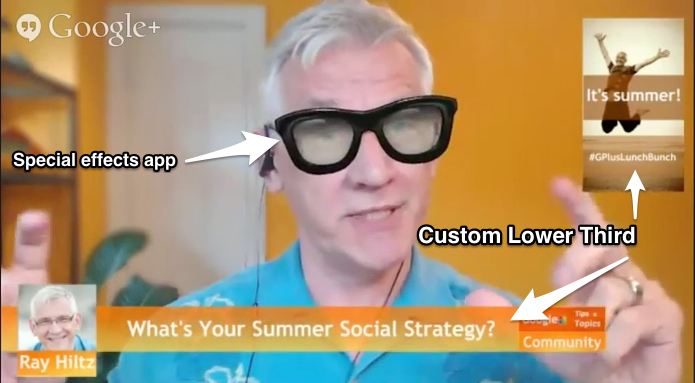
If you host or guest on a Google+ Hangout On Air, you’ve probably seen those “newsroom” like bars at the bottom of the screen identifying the person above it.
These bars are referred to as lower thirds.
Google+ Hangouts has a third party app called the Hangout Toolbox
This is the number one used Hangout app, which is not surprising due to its simplicity and features such as the ability to upload your brand logo and save your lower thirds as presets.
I've written a detailed article on my NewRayCom blog that includes a short video that shows you how to quickly add a Lower Third using the Hangout Toolbox.
You can read it here: http://goo.gl/6QqycV
To take advantage of the great branding opportunities that Hangouts provide, I create custom Lower Thirds and Graphics using the free Chrome extension, iPiccy
There are many free photo editors available for those of us who are Photoshop challenged, but I always find myself going back to iPiccy for its ease of use and number of features.
I've included an album of my screen shots to make it easy for you to scan through. If you need more detail or want to watch the video, go to www.newraycom.com.
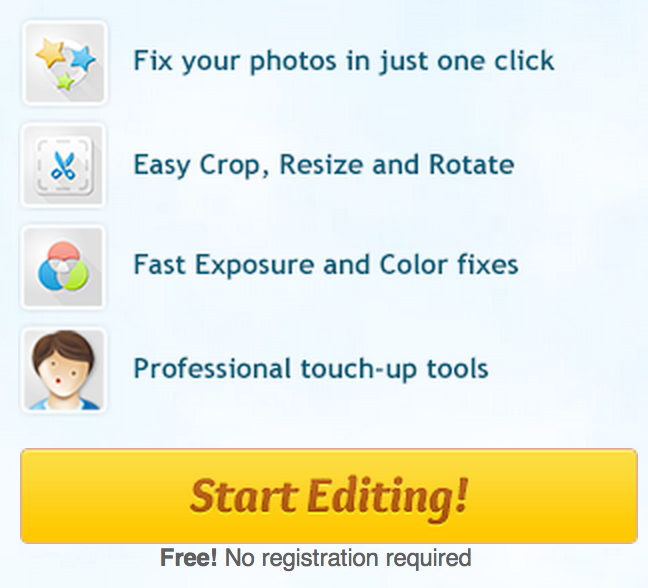
1, 2 - Download the iPiccy Chrome extension and "start editing".
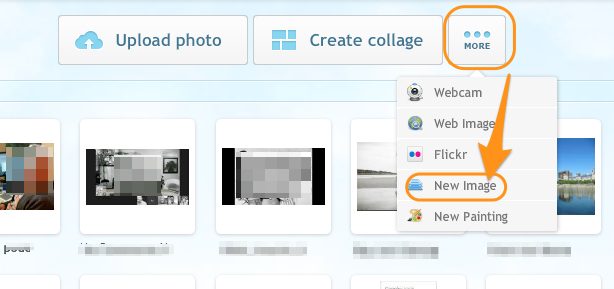
3. Click on the “more” option, then on “new image”.
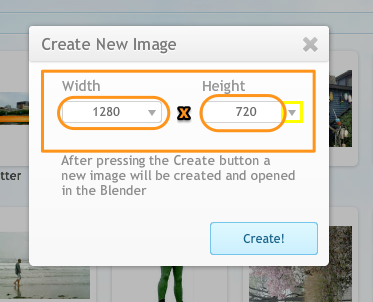
4. The optimal size for a HD video is 1280px x 720px
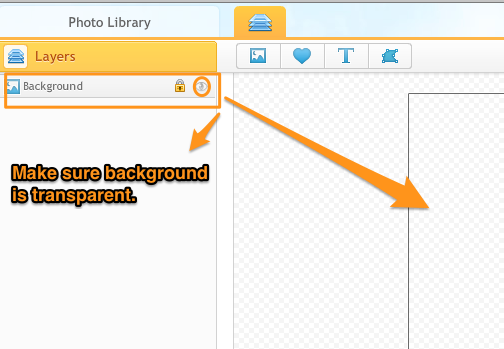
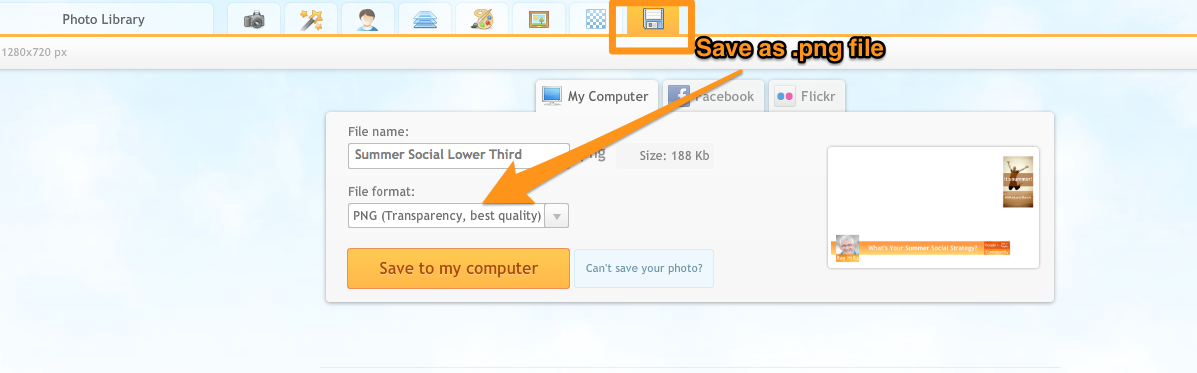
5. Make sure your background is transparent. (Then save as a .png file)
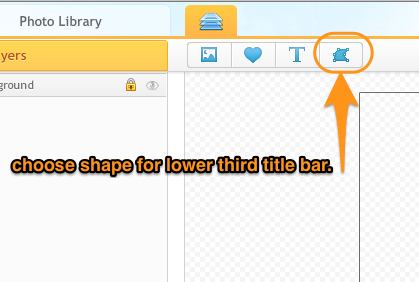
6. To create a typical “identification lower third bar”, I choose a rectangular shape after clicking the “shapes” icon.
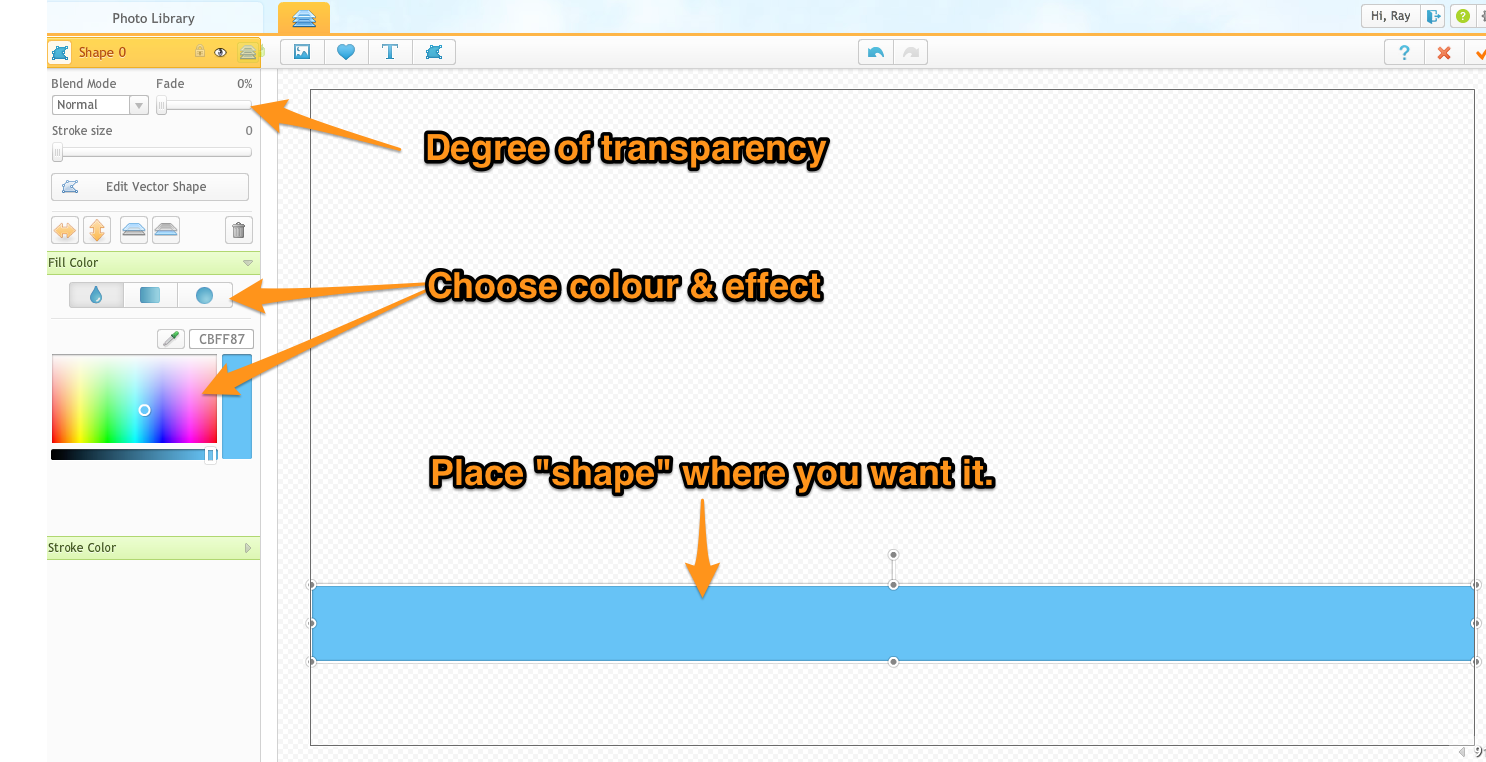
7. Choose size and colour of banner.Select transparency. I usually around 20% works well. , effect and degree of transparency. I find 20% works well.
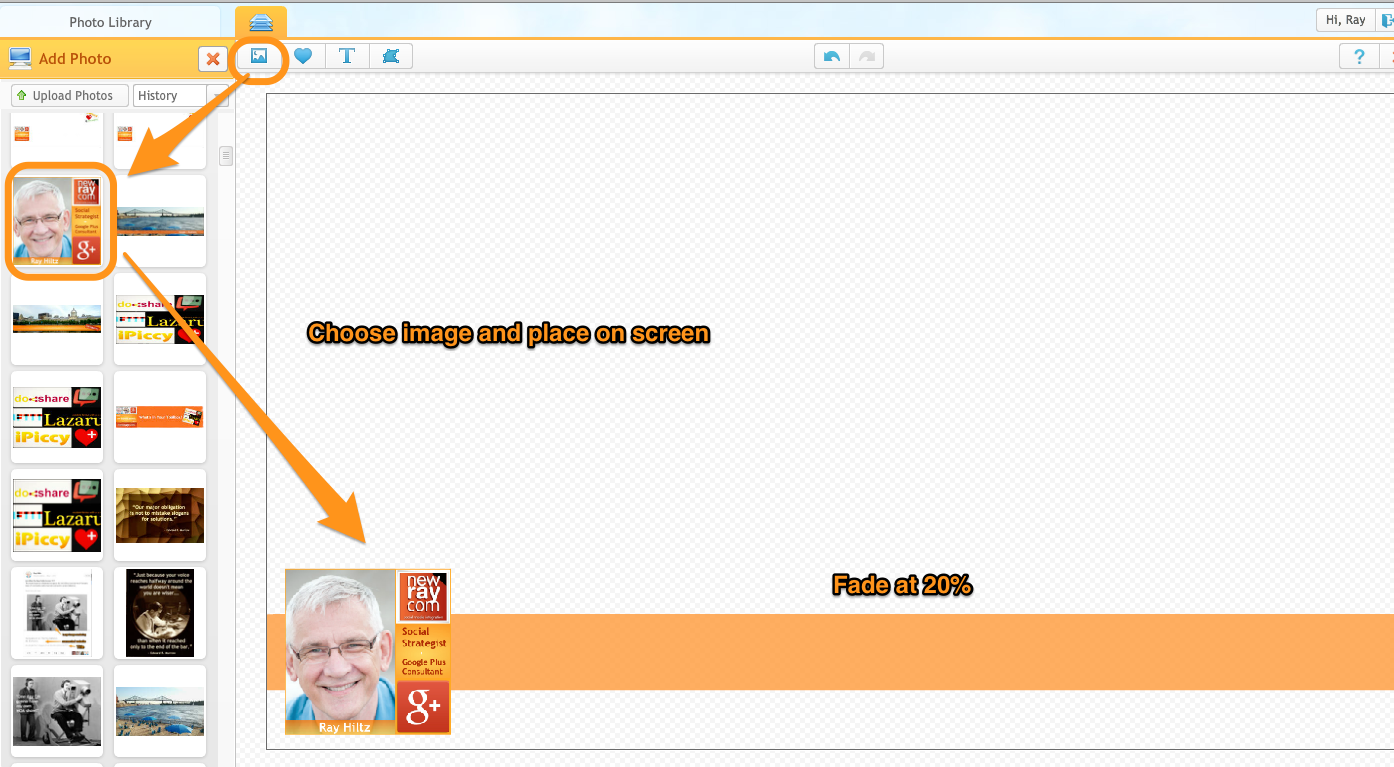
8. Import a brand logo or your profile image by clicking on the photo icon next to “add photo”. You can upload one from your computer or choose one that you’ve already uploaded.
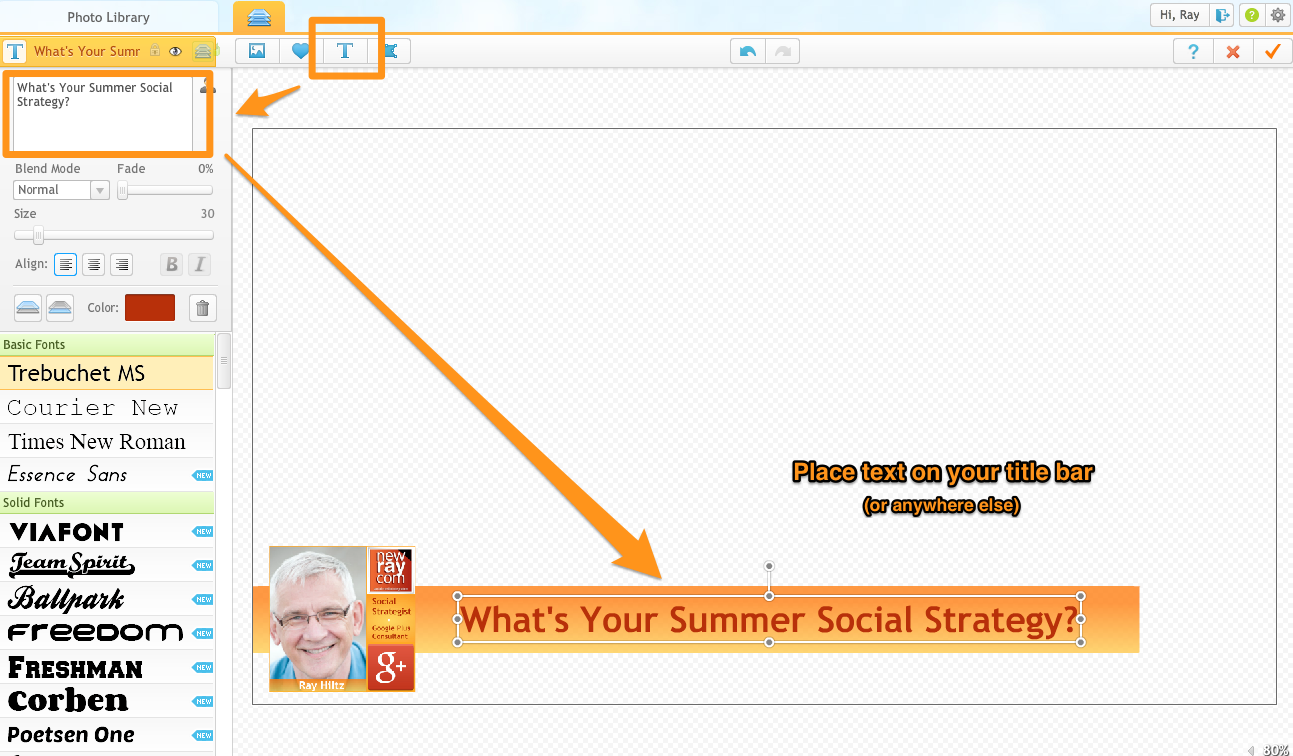
9. Add text to your lower third. (or anywhere else inside the view area). _Be careful your text or graphics don’t hide you. Best to keep them near the outside frame._
I keep graphics within a 200px frame on either side and 150px from the bottom.
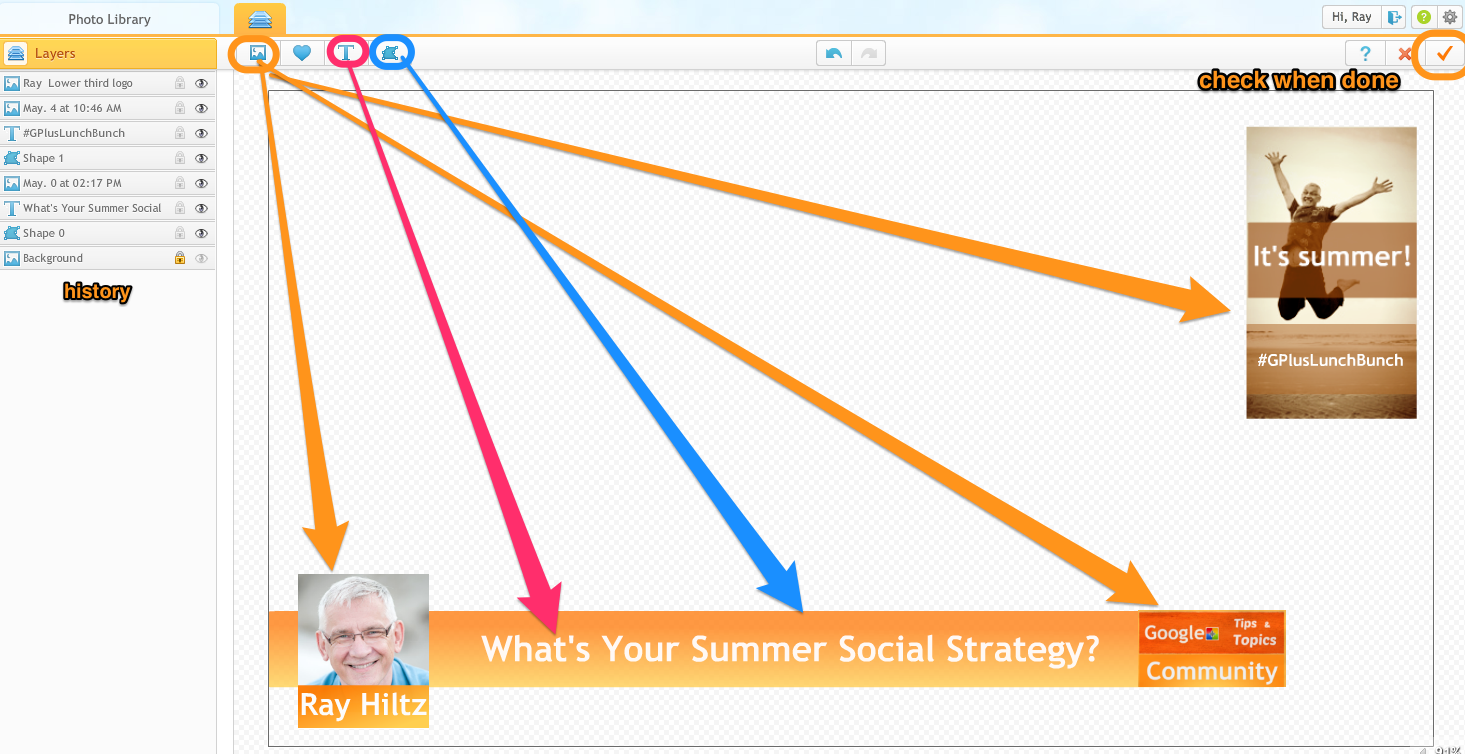
10. You can add other images or add text. Again, be careful to allow enough "empty space" in the centre of your frame.
11. Click on the checkmark and save as a .png file to your hard or Google Drive.
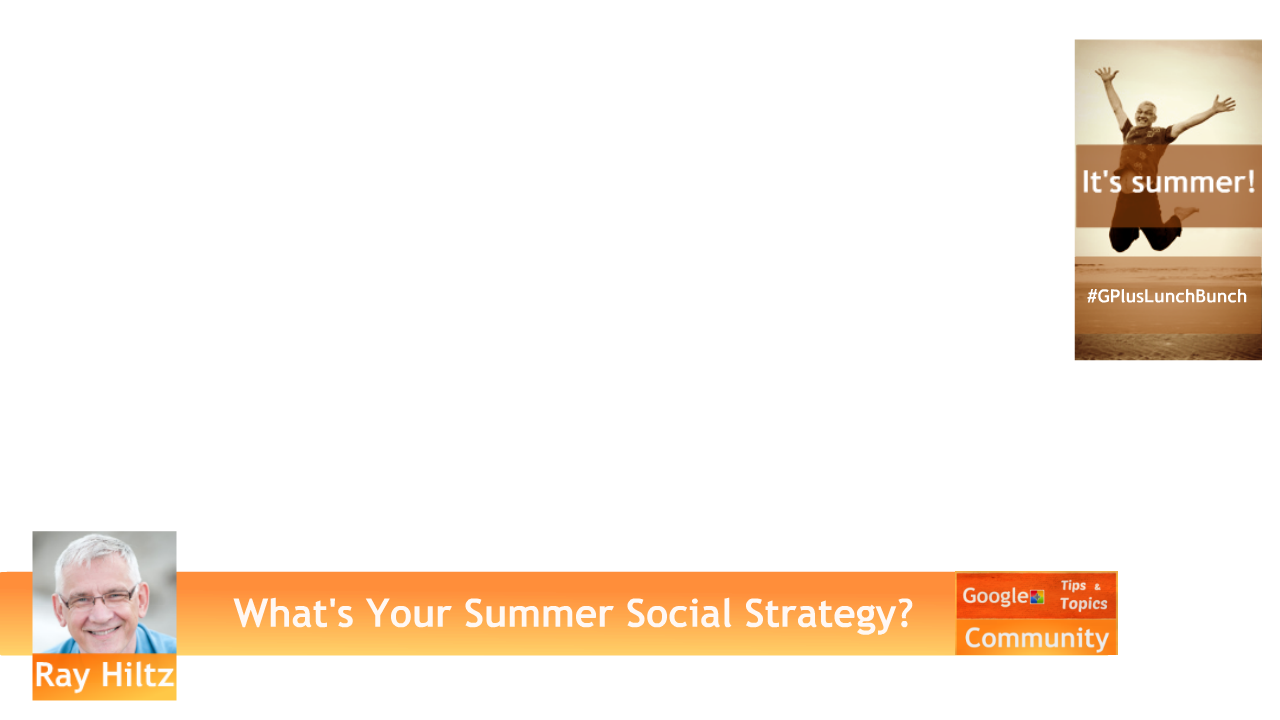
12. Your finished Hangout overlay. Notice all you see are the elements you added.
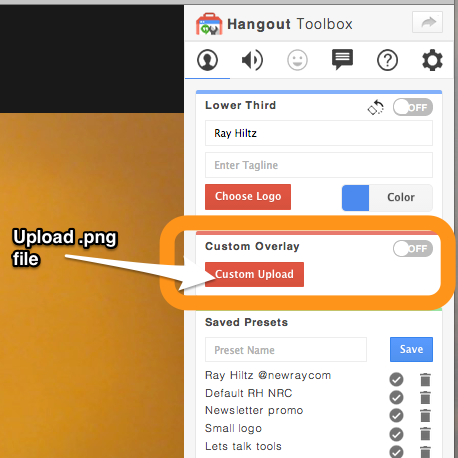
13. Open a Hangout and open the Hangout Toolbox. Go down to “custom overlay”, click on the “custom upload” button and upload the .png file you just saved.
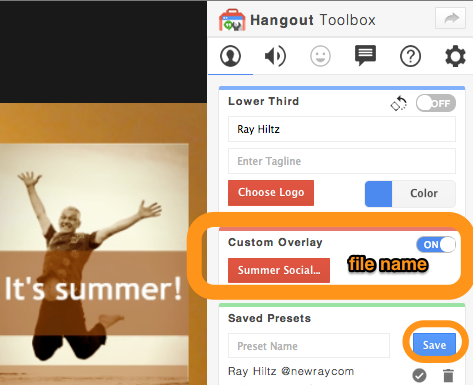
14. Turn the custom overlay feature "on" and check to see if it appears.
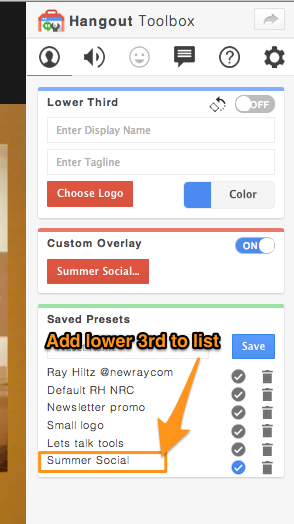
15. While leaving the custom overlay “on”, type the name of the file in the “saved presets” field and hit “save”. The file will show up at the bottom of your "presets" and be available when you open a hangout.
(The toolbox has an option to have the last Lower Third you used to automatically appear when you load a new Hangout. (upper right gear wheel - settings)
The saved presets list is a super tool for accessing special promo graphics that you want to use during your hangouts such as call to actions, web links etc..
I hope you found this helpful. Please share if you and think others might also.
h/t Ronnie Bincer for inspiring the format of this post.
Have a great weekend!
#HangoutLowerThirds #HOA #graphics
Originally shared by Ray Hiltz
How to Create Custom Hangout Lower Thirds with iPiccy
(Click on album below for step by step guide)
If you host or guest on a Google+ Hangout On Air, you’ve probably seen those “newsroom” like bars at the bottom of the screen identifying the person above it.
These bars are referred to as lower thirds.
Google+ Hangouts has a third party app called the Hangout Toolbox
This is the number one used Hangout app, which is not surprising due to its simplicity and features such as the ability to upload your brand logo and save your lower thirds as presets.
I've written a detailed article on my NewRayCom blog that includes a short video that shows you how to quickly add a Lower Third using the Hangout Toolbox.
You can read it here: http://goo.gl/6QqycV
To take advantage of the great branding opportunities that Hangouts provide, I create custom Lower Thirds and Graphics using the free Chrome extension, iPiccy
There are many free photo editors available for those of us who are Photoshop challenged, but I always find myself going back to iPiccy for its ease of use and number of features.
I've included an album of my screen shots to make it easy for you to scan through. If you need more detail or want to watch the video, go to www.newraycom.com.
1, 2 - Download the iPiccy Chrome extension and "start editing".
3. Click on the “more” option, then on “new image”.
4. The optimal size for a HD video is 1280px x 720px
5. Make sure your background is transparent. (Then save as a .png file)
6. To create a typical “identification lower third bar”, I choose a rectangular shape after clicking the “shapes” icon.
7. Choose size and colour of banner.Select transparency. I usually around 20% works well. , effect and degree of transparency. I find 20% works well.
8. Import a brand logo or your profile image by clicking on the photo icon next to “add photo”. You can upload one from your computer or choose one that you’ve already uploaded.
9. Add text to your lower third. (or anywhere else inside the view area). _Be careful your text or graphics don’t hide you. Best to keep them near the outside frame._
I keep graphics within a 200px frame on either side and 150px from the bottom.
10. You can add other images or add text. Again, be careful to allow enough "empty space" in the centre of your frame.
11. Click on the checkmark and save as a .png file to your hard or Google Drive.
12. Your finished Hangout overlay. Notice all you see are the elements you added.
13. Open a Hangout and open the Hangout Toolbox. Go down to “custom overlay”, click on the “custom upload” button and upload the .png file you just saved.
14. Turn the custom overlay feature "on" and check to see if it appears.
15. While leaving the custom overlay “on”, type the name of the file in the “saved presets” field and hit “save”. The file will show up at the bottom of your "presets" and be available when you open a hangout.
(The toolbox has an option to have the last Lower Third you used to automatically appear when you load a new Hangout. (upper right gear wheel - settings)
The saved presets list is a super tool for accessing special promo graphics that you want to use during your hangouts such as call to actions, web links etc..
I hope you found this helpful. Please share if you and think others might also.
h/t Ronnie Bincer for inspiring the format of this post.
Have a great weekend!
#HangoutLowerThirds #HOA #graphics
Tuesday, April 22, 2014
What about after the Event is over and you are not on Google Plus?

What about after the Event is over and you are not on Google Plus?
Here!
Originally shared by Business Hangouts
Google Plussers + Facebookers + LinkedInners, all in the same Event
Did You Know?
#businesshangouts is the only platform which allows your attendees not only to join with their preferred Social Network, to view your Hangout on Air, and to engage in the chat, but also to watch the replay in that same environment, thanks to BHO Events.
Your Facebook audience or LinkedIn members of your larger community don't need a G+ account to attend and engage in the chat. And all that happens on your own website!
Go BHO , increase your outreach and build Your Own Digital Assets of community members.
Watch this sample replay to check it out:
https://business-hangouts.com/first-bho-event-presenting-bho-events/
#facebook #linkedin #BHOEvents #HOA
Thursday, April 17, 2014
Hi

Hi,
I am happy to share with you this map of best practises to perform a #HOA
Have a nice day
Pascal.
The YouTube Live Streaming team recently discussed

Originally shared by Bern Rexer
The YouTube Live Streaming team recently discussed
the difference between YouTube Live and Google Hangouts on Air
Watch:
YouTube live FAQ March 2014
#youtubelive #hangoustsonair #hoa #googlehangouts #live
Subscribe to:
Posts (Atom)